 ultimate-guide
Scale Home Services Without Adding Staff: 2026 Guide
Table of Contents
- Why Home Services Businesses Struggle to Scale Without Hiring
- Automating Lead Follow-Up for Small Businesses
- Deploying an AI Appointment Booking System
- Integrating an AI Receptionist for Small Businesses
- How to Automate Appointment Scheduling Across Your Operations
- Using Contractors and Freelancers to Expand Capacity
- Measuring Capacity and Unit Economics
- Building a Scalable Operations Framework
- Frequently Asked Questions
Last Updated: October 17, 2026
Why Home Services Businesses Struggle to Scale Without Hiring
Home services businesses face a structural constraint: capacity is tied directly to labor. Yet the businesses that grow fastest have found a way to scale home services without staff by automating the administrative layer instead of hiring more technicians, plumbers, electricians, or cleaners.
The real bottleneck isn't capacity, it's administrative overhead. Your team spends hours on non-revenue tasks: answering phones, scheduling, following up with leads, managing intake forms, and rescheduling no-shows.
At Vaz Global Capital, we've found the same pattern across verticals: teams that scale home services without staff automate the administrative layer so existing members focus on billable hours.
The gap between a $500K business and a $1M+ business often isn't more staff. It's better systems.
Automating Lead Follow-Up for Small Businesses
Most leads die in follow-up. A prospect inquires, gets routed to voicemail, and doesn't hear back for two days. By then, they've called three competitors.
Automated lead follow-up systems handle this instantly. When a lead comes in, whether through your website, a phone call, or a text, the system immediately sends a confirmation message, schedules a callback, or qualifies the prospect with targeted questions.
Follow-up speed directly impacts conversion: leads contacted within the first hour are far more likely to book. For home services, where customers call multiple providers at once, being first to respond often wins the job.
How Lead Follow-Up Automation Frees Your Team
Removing manual follow-up recovers hours each week.
The second benefit is consistency. Automated systems follow the same script every time: no forgotten confirmations, no missed callback windows, no high-value leads slipping through because someone was busy.
The third benefit is data capture. Every interaction is logged automatically, when the lead responded, what they said, what service they need, what time window works, and feeds directly into scheduling, eliminating re-entry and reducing errors.
Choosing the Right Follow-Up Workflow
Match the workflow to your business model.
For services needing a site visit estimate first (roofing, renovation, foundation work): lead intake → qualification → estimate scheduling → post-estimate follow-up → conversion tracking.
For recurring services (cleaning, lawn care, pest control), add retention workflows: booking confirmation → pre-service reminder → post-service follow-up → rebooking trigger.
HubSpot's research on lead response times shows that immediate follow-up significantly improves conversion rates, making automation a competitive necessity rather than a luxury.
Deploying an AI Appointment Booking System
An AI appointment booking system eliminates the back-and-forth that wastes time for your team and customers. The customer initiates booking, the system checks real-time availability, and the appointment is confirmed automatically.
The system works 24/7. A customer can book at 11 PM on a Sunday; your team doesn't respond until Monday, but the appointment is already confirmed and on the dispatch schedule.
Reducing No-Shows and Rescheduling Work
No-shows are a direct profit killer: a technician drives out, finds no one home, and that hour is lost revenue.
When a customer needs to reschedule, the system handles it automatically if capacity exists: they open the reminder, click "reschedule," pick a new time, and confirm.
For tight capacity, the system can manage a waitlist: when a customer cancels, it offers the slot to waiting customers in order, starting with those who need it soonest, maximizing use without manual intervention.
Integrating an AI Receptionist for Small Businesses
An AI receptionist answers calls 24/7, handles initial inquiries, and routes information directly into your system. Unlike a traditional answering service that takes a message, it qualifies the caller, captures details, and can schedule appointments or send intake forms without your team lifting a finger.
For home services, this changes the economics of call handling: no front desk to staff, no one monitoring the phone during business hours. Calls are answered instantly, qualified automatically, and routed to the right person or system.
Handling Calls and Intake Without a Front Desk
For law firms, immigration attorneys, and family law practices, intake is even more critical.
It also handles common questions: "What's your service area?" "Do you offer emergency calls?" "What's the cost of a consultation?" For questions it can't answer, it routes to a human, but only after capturing the caller's information and reason for the call.
How to Automate Appointment Scheduling Across Your Operations
Appointment scheduling automation isn't just a customer-facing booking page. It connects that booking to dispatch, technician availability, service duration, travel time, and capacity constraints.
A siloed booking system creates chaos: a customer books a 2-hour appointment, but the system ignores 45 minutes of travel time between jobs.
Real scheduling automation integrates multiple layers: real-time technician location, service duration per job type, travel time between locations, appointment buffer time, and capacity limits per day or per technician.
Syncing Scheduling With Dispatch and Routing
When a booking is confirmed, the system should assign it to the best available technician based on location, skills, and workload. The appointment appears instantly in dispatch, and technicians see the new job on their mobile app in real time.
This eliminates the manual dispatch step: no hand-assigning jobs, no miscommunication about who's doing what, no double-bookings because dispatch didn't know about an online booking.
For variable-duration services, some jobs take 30 minutes, others 3 hours, the system should calculate realistic slots.
Preventing Overbooking and Capacity Overruns
Overbooking happens without visibility into real capacity: too many appointments in one day, technicians work overtime, quality drops, and customers complain about rushed service.
Automated scheduling prevents this with hard capacity limits. You define "a maximum of 8 appointments per day" or "4 jobs per technician," and the system won't accept a 9th booking, offering the next available slot instead.
For seasonal services, lawn care busier in spring, HVAC in summer, you can adjust capacity limits by season so July has different constraints than January.
Using Contractors and Freelancers to Expand Capacity
When you've optimized your existing team's workflow and still can't meet demand, contractors and freelancers become your scaling lever. You bring them in for specific tasks or projects, so you only pay for capacity you actually use.
For home services, your core team handles recurring customers and high-value jobs while contractors handle overflow and one-time projects. For professional services, contractors might cover intake calls during peak periods, administrative work, or specialized services you don't offer in-house.
Task-Based Hiring vs. Full-Time Staff
The advantages are clear: no payroll overhead, no benefits or employment taxes, and you can scale up or down quickly as demand shifts.
The tradeoff: contractors need clear systems and documentation. They can't learn your process through osmosis, so they need written workflows, scripts, tool access, and defined success metrics. This is where automation infrastructure becomes essential.
Managing Quality and Compliance With External Workers
Quality control with contractors requires different mechanisms than with full-time staff: documented processes, recorded interactions, and measurable outputs instead of in-person supervision.
For customer-facing work, that means recording and reviewing calls, logging emails visibly to your team, and tracking all appointments in your system.
For compliance-heavy work, particularly law firms and immigration practices, contractor management is more complex.
The FTC's guidance on business practices emphasizes that service businesses remain responsible for contractor conduct, so clear agreements and oversight are essential.
Measuring Capacity and Unit Economics
You can't optimize what you don't measure. Most service businesses track revenue but not the unit economics that drive profitability: revenue per technician, revenue per hour, cost per appointment, or use rate.
These metrics reveal where you're actually constrained. Flat revenue per technician while revenue grows means you're adding staff without improving efficiency. Use at 60% means capacity to grow without hiring. Rising cost per appointment means systems are becoming inefficient.
Tracking Workload and Identifying Bottlenecks
The first step is visibility into how your team spends time, not surveillance, but understanding where hours go.
Eliminating that 2 hours of non-billable time through automation increases capacity by 25% without hiring.
Workload tracking also reveals bottlenecks: a dispatcher spending 3 hours daily assigning jobs, an office manager spending 2 hours on confirmations, technicians spending 30 minutes each on intake paperwork. These are automation opportunities with direct ROI.
Calculating Revenue Per Team Member
Revenue per team member reveals whether you're scaling efficiently. Five technicians generating $2M is $400K per technician; hire a 6th and grow to $2.2M and it drops to $366K, a decline despite growth.
That decline usually means you've added overhead without efficiency: the 6th technician may be less experienced, your systems may not scale to support more people, or you're spending more time on management and coordination.
Track it monthly. Declining means improve systems before hiring more staff; stable or rising means you can scale without efficiency losses.
Building a Scalable Operations Framework
Scaling without adding staff requires infrastructure: documented processes, integrated systems, and clear decision rules, the operational backbone that lets your existing team handle more volume.
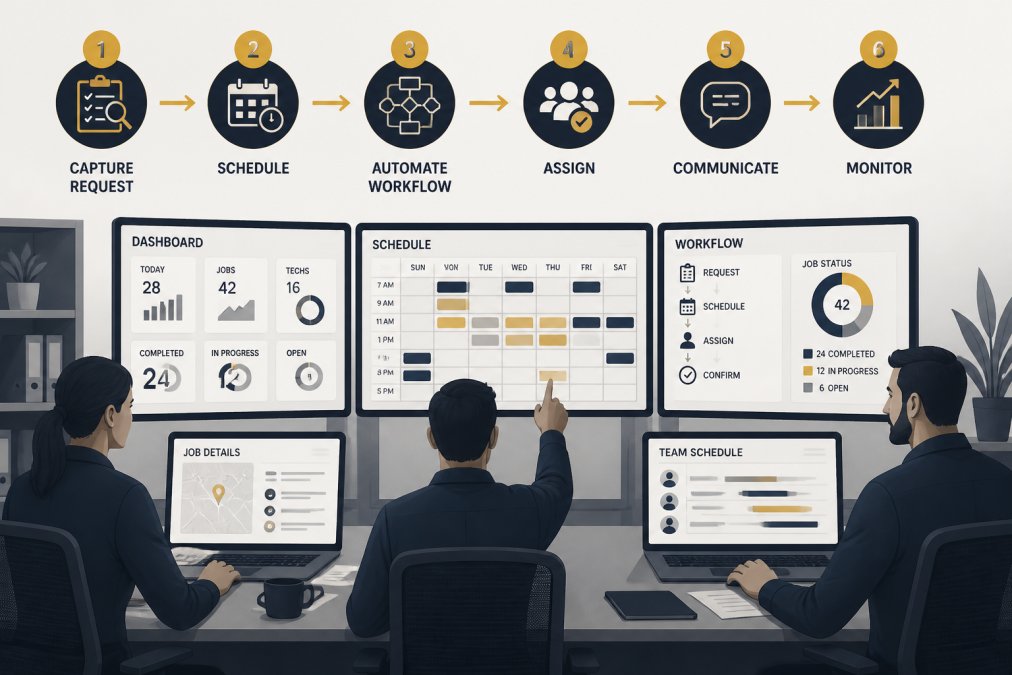
A scalable framework has three components: repeatable processes, integrated systems, and defined responsibilities. Without all three, bottlenecks get worse as you grow.
Documenting Repeatable Processes
These documents ensure consistency so every customer gets the same experience, enable faster training for new contractors or team members, and reveal inefficiencies that point to automation opportunities.
For home services, that includes the customer inquiry workflow, appointment scheduling, pre-service checklist, on-site intake, post-service follow-up, and complaint resolution.
For law firms and professional services, documented processes are even more critical due to compliance: intake workflows, conflict-checking, document management, and client communication protocols all need to be explicit.
Integrating Systems to Eliminate Manual Work
Integration is where scaling actually happens. When systems don't talk to each other, you create manual handoffs. Information gets re-entered. Mistakes happen. Time gets wasted.
When these systems are disconnected, someone manually moves information between them, and that's where hours disappear.
McKinsey's research on operational efficiency shows that integrated workflows reduce manual work by 30-40%, freeing capacity for growth-focused activities.
At Vaz Global Capital, we help service businesses design these integrated workflows.
Scaling a home services business without adding staff isn't about working harder.
Frequently Asked Questions
How can a home services business scale without hiring more full-time employees?
Scale by automating repetitive tasks like lead follow-up, appointment scheduling, and intake, freeing your existing team to focus on billable work. Combine automation with task-based hiring of contractors for peak demand, remote-first operations for administrative roles, and outsourced specialists for non-core functions. This approach reduces payroll burden while increasing capacity and margins.
What tasks should a home services business automate first?
Start with high-volume, low-complexity tasks: automated lead follow-up, appointment scheduling, and missed-call responses. These deliver immediate time savings. Next, automate intake and qualification to reduce manual phone screening. Finally, integrate CRM and dispatch systems to eliminate data entry. Prioritize automations that your team repeats daily or weekly.
How does an AI appointment booking system help home services companies handle more leads?
An AI appointment booking system removes the administrative bottleneck of manual scheduling. It accepts bookings 24/7, confirms appointments automatically, reduces no-shows through reminders, and syncs with your dispatch system. Your team spends less time on the phone managing availability and more time delivering service, effectively multiplying your operational capacity without adding staff.
What's the difference between using an AI receptionist versus hiring a virtual assistant for small businesses?
An AI receptionist handles calls, intake, and basic routing instantly without breaks or sick days. A virtual assistant is a person who handles email, scheduling, and customer support but requires training, supervision, and ongoing payroll. AI receptionists cost less, scale instantly, and work around the clock. Use them for high-volume, repetitive intake; hire virtual assistants for complex, judgment-based tasks.
How do I know if my home services business can take on more work without adding staff?
Calculate your revenue per team member and measure current workload utilization. If your team is operating at 60-75% capacity and margins are healthy, automation and task-based hiring can safely increase volume. If you're already at 90%+ utilization, you'll need to add capacity first. Track these metrics monthly to identify the exact point where hiring becomes necessary versus where automation suffices.
What happens if we automate appointment scheduling but our dispatch system doesn't integrate with it?
Without integration, your team manually enters bookings into dispatch, creating delays and errors. Integration syncs appointments directly to routing software, calculates travel time, prevents overbooking, and sends real-time updates to customers. This eliminates duplicate data entry and ensures your field team always has accurate, current schedules, the core benefit of automation disappears without it.