 blog
blog
Hiring Automation Consultants for Business Growth
Table of Contents
- What a Business Automation Consultant Does
- Business Automation Examples That Drive Growth
- How to Choose an Automation Consultant
- Automation Consultant vs DIY: When to Hire Professional Help
- Automation Implementation Timeline and Process
- Identifying Processes Ready for Automation
- Measuring ROI and Success After Implementation
- Frequently Asked Questions
Last Updated: October 13, 2026
What a Business Automation Consultant Does
Hiring automation consultants means working with professionals who analyze your workflows, identify inefficiencies, and design custom solutions. They don't just implement tools, they map your processes and integrate systems so they work together seamlessly.
The core work is diagnosis, strategy, and execution: audit operations to spot bottlenecks, design a tailored automation strategy, then oversee implementation and ensure your team can maintain the system long-term.
What sets a strong consultant apart is thinking beyond individual tools. Many businesses already use Zapier or Make, but a consultant should architect something bigger: a cohesive workflow that eliminates redundant steps, reduces human error, and scales as you grow.
The best consultants ask hard questions upfront: What's your real bottleneck? What would success look like in 90 days? Who owns this after launch? These answers shape everything that follows.
Business Automation Examples That Drive Growth
Automation creates value differently depending on your business type. Realistic examples:
Lead management and follow-up. Service businesses lose leads when follow-ups aren't consistent. A consultant can set up automated qualification messages that route hot prospects to sales while nurturing cold leads, keeping your pipeline full without manual data entry. Tools like AI Lead Follow-Up Automation and AI Lead Qualification can streamline this process.
Appointment scheduling and reminders. When clients book through your website, automation can send confirmations, calendar reminders, and intake forms, reducing no-shows and admin overhead at once. AI Appointment Booking systems handle this seamlessly.
Client onboarding workflows. Firms spend weeks manually onboarding clients: sending documents, collecting signatures, scheduling kickoffs. Automation can trigger a sequence that delivers everything in order, collects responses, and flags your team when action is needed.
Missed call recovery. A missed call is a lost opportunity.
Data synchronization across systems. Many businesses run a CRM, email platform, and project management tool that don't talk to each other.
Invoice and payment follow-up. Automating payment reminders, late notices, and invoice delivery improves cash flow without hours of admin work.
The common thread: these automations remove repetitive work and create the consistency your business needs to scale.
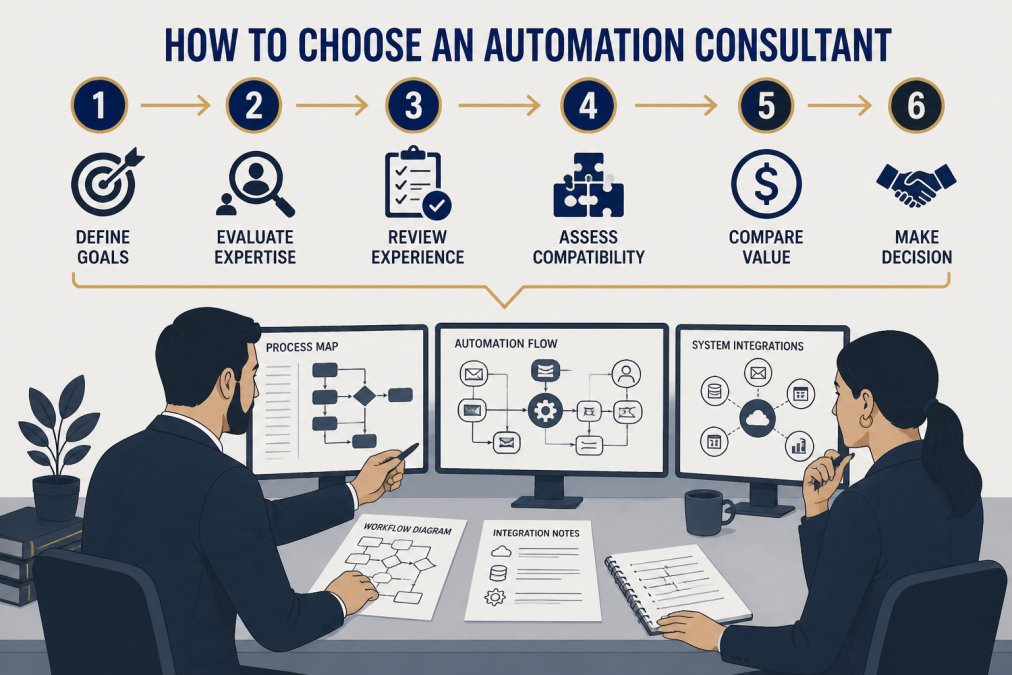
How to Choose an Automation Consultant
Choosing the wrong consultant when hiring automation consultants wastes time and money. The right one understands your industry, asks the right diagnostic questions, and builds solutions your team can maintain. Most hiring advice stops at "look for experience" and "check references", that's not a decision framework. What follows is a repeatable scorecard for comparing candidates side by side.
The Six-Criteria Comparison Framework
Score every candidate 1-5 on these six criteria, then weight them based on what matters most. A weighted score turns a gut-feel decision into a defensible one.
| Criterion | What to Evaluate | Suggested Weight |
|---|---|---|
| Industry experience | Have they solved problems in your sector, not just your tool stack? | 20% |
| Implementation approach | Do they map processes before building, test in a sandbox, and train your team? | 20% |
| Integrations | Can they connect the specific systems you already run (CRM, email, scheduling, accounting)? | 15% |
| Support model | What happens after launch? Is there a defined support window and escalation path? | 15% |
| Pricing model | Is it fixed-fee, hourly, retainer, or value-based? Does it align with scope? | 15% |
| Measurable outcomes | Do they commit to specific metrics (response time, hours saved, error rate)? | 15% |
A consultant who scores 5 on industry experience but 2 on support may be a poor long-term fit.
Interview Questions That Reveal Real Capability
Generic questions get generic answers. These force candidates to demonstrate how they actually work:
- "Walk me through the last workflow you mapped. What did the process map look like, and what did you change after reviewing it with the client?"
- "Tell me about an automation that failed or underperformed. What went wrong, and how did you fix it?"
- "How do you decide whether a process should be automated at all?"
- "What does your handover process look like? Show me a training document or runbook you have delivered."
- "How do you handle a client whose team resists the new system?"
- "What is your escalation path when an automation breaks at 2 a.m.?"
The answers matter more than credentials.
Reference Checks and Red Flags
Ask for two or three references from clients whose business resembles yours. When you call, ask:
- Did they deliver on the proposed timeline?
- How did they handle scope changes?
- What did handover and training actually look like?
- Would you hire them again?
Red flags to watch for:
- Promises to "automate everything" without asking detailed questions about your workflows, team structure, and goals.
- Proposals that list tools rather than outcomes. A good proposal explains what problem is being solved and how.
- No discussion of ongoing maintenance. Every automation system needs updates as your business evolves.
- Quotes that seem too low. Automation consulting requires real work: process mapping, system design, testing, training. A bargain quote usually means corners will be cut.
- Reluctance to share a process map or runbook from a past project.
Score candidates on the six criteria, ask the six interview questions, and call at least two references. If a consultant cannot answer the failure question with a specific story, that is your answer.
Automation Consultant vs DIY: When to Hire Professional Help
Some businesses try building automations themselves using platforms like Zapier or Make. This works for simple, linear processes, connecting a form to an email notification, routing a new customer to a spreadsheet, but it has limits.
DIY fails when workflows are complex, interconnected, or span multiple systems. Syncing data between your CRM, email platform, project management tool, and accounting software with specific rules is beyond what DIY handles reliably.
Hiring a consultant makes sense when:
- Your workflows involve more than three systems
- You've tried DIY automation and it created more problems than it solved
- Your team doesn't have the technical depth to maintain what you build
- The cost of a manual process is high enough that professional help pays for itself quickly
- You need something built right the first time because a failed implementation would disrupt your business
Automation Implementation Timeline and Process
A typical implementation spans 4-12 weeks depending on complexity. Simple automations, like connecting a form to an email notification, take 1-2 weeks. Complex, multi-system workflows can take 8-12 weeks or longer.
The process usually follows this sequence:
Discovery and mapping (1-2 weeks). The consultant interviews your team, documents current workflows, and identifies pain points. Don't rush this phase.
Strategy and design (1-2 weeks). The consultant proposes a solution architecture. Ask questions, push back if something feels off, and align on what success looks like.
Build and testing (2-6 weeks). The consultant builds in a test environment, tests edge cases, and refines based on feedback.
Training and launch (1-2 weeks). Your team learns to use the system, handle breakages, and maintain it long-term.
Post-launch support (ongoing). Good consultants offer a support window, typically 30-90 days, to catch issues that emerge once the system is live.
Timelines slip when scope expands mid-project, when your team isn't available for meetings and training, or when the consultant discovers your systems are more complex than initially thought.
Identifying Processes Ready for Automation
Not every process should be automated. Start with repetitive, rule-based tasks that follow the same steps with few exceptions. If every situation is unique and requires judgment, automation helps less.
Look for processes that consume significant time. Automating a 10-hour-a-week manual task has real impact; automating a 30-minute monthly task has lower ROI.
Prioritize processes affecting customer experience or revenue. Automating lead follow-up matters more than internal status reports; appointment reminders prevent no-shows and lost revenue.
Consider processes where errors are costly. If manual data entry damages customer relationships or creates compliance issues, automation reduces risk and improves quality.
The best approach: audit your workflows with a consultant and score them. Prioritize high frequency, high time investment, and high business impact. Start there, prove the concept, then move to the next tier.
Measuring ROI and Success After Implementation
Automation's value isn't always obvious immediately, and the simple "hours saved times hourly rate" calculation is misleading. It ignores implementation cost, maintenance, adoption friction, and the risk the automation doesn't work as planned.
The Risk-Adjusted ROI Formula
Start with the gross annual benefit, then subtract the costs and apply a confidence factor:
Gross annual benefit = hours saved per week x loaded hourly cost x 52 weeks
Net annual benefit = gross annual benefit - (implementation cost + annual maintenance cost)
Risk-adjusted benefit = net annual benefit x confidence factor
The confidence factor reflects how likely the automation is to deliver as expected. A simple, well-understood workflow might warrant 0.9; a complex, multi-system integration with adoption risk might warrant 0.6 or lower. This is planning, not pessimism.
For example, if automation saves 15 hours per week at a loaded cost of $50 per hour, gross annual benefit is $39,000. With $12,000 implementation and $3,000 annual maintenance, net annual benefit is $24,000. At a 0.7 confidence factor, risk-adjusted benefit is $16,800.
Implementation Timelines and Payback Periods
Payback period is the time for cumulative savings to exceed total cost. A common pattern:
- Simple automations (form-to-email, basic routing): 1-2 weeks to build, payback in 1-3 months.
- Moderate workflows (CRM sync, lead follow-up sequences): 4-8 weeks to build, payback in 3-6 months.
- Complex multi-system integrations: 8-12 weeks or longer, payback in 6-12 months.
Timelines slip when scope expands mid-project, your team is unavailable for meetings and training, or the consultant finds your systems more complex than expected. Build buffer into your expectations and payback math.
Ongoing Costs Most Businesses Forget
Implementation isn't the end of the cost. Budget for:
- Maintenance and monitoring. Automations break when APIs change, your CRM updates, or business rules shift. Expect ongoing monitoring and periodic fixes.
- Staff training and retraining. Turnover means new employees need to learn the system. Budget for refresher training.
- Vendor dependence. If your consultant disappears, you may be locked into their support. Ask for documentation and runbooks at handover.
- Tool subscription changes. Platforms change pricing tiers and feature limits. A workflow cheap at 1,000 tasks per month may become expensive at 10,000.
Metrics to Track Beyond Time Saved
Time saved is the most direct metric, but not the only one. Track:
- Quality improvements. Did automation reduce errors, improve response times, or change customer satisfaction scores?
- Revenue impact. Did automating lead follow-up increase conversion? Did reducing missed calls improve lead capture? Did faster onboarding reduce time-to-revenue?
- Adoption rate. What percentage of your team actually uses the system as intended? Low adoption is the most common reason automation fails to deliver ROI.
Set success metrics before launch. Vague goals like "improve efficiency" are hard to measure; specific goals like "reduce lead response time from 24 hours to 2 hours" give you something concrete to track.
Do not measure ROI on time saved alone. If your team does not adopt the system, or if maintenance costs creep up, a project that looked profitable on paper can quietly become a net loss.
Frequently Asked Questions
What does a business automation consultant do?
A business automation consultant analyzes your workflows, identifies manual bottlenecks, and designs custom solutions to streamline operations. They map existing processes, recommend tools and integrations, oversee implementation, and ensure your team can maintain the automation long-term. Their goal is to reduce repetitive work, cut labor costs, and free your staff to focus on higher-value tasks that drive business growth.
When should I hire an automation consultant versus building automations myself?
Hire a consultant if your workflows are complex, span multiple systems, require custom integrations, or involve significant data migration. DIY tools like Zapier work for simple, single-process automations. A consultant is worth the investment when automation failures cost you revenue, your team lacks technical expertise, or you need a strategy that touches multiple departments. They also handle change management and training.
How long does business automation implementation typically take?
Simple automations may take 2-4 weeks, while complex multi-system integrations can take 2-3 months. The timeline depends on process complexity, data volume, system compatibility, and team availability. A consultant should provide a detailed implementation roadmap upfront, breaking the project into phases so you can see progress and adjust priorities. Expect ongoing optimization even after launch.
What should I ask an automation consultant before hiring them?
Ask about their experience with your industry and system types, how they approach process diagnosis, what tools they typically recommend, and how they handle team training and adoption. Request case studies or references showing measurable outcomes like time savings or cost reduction. Clarify their role post-launch: do they provide ongoing support, monitoring, or optimization? Also ask how they manage scope creep and what happens if your business needs change mid-project.